.jpg)
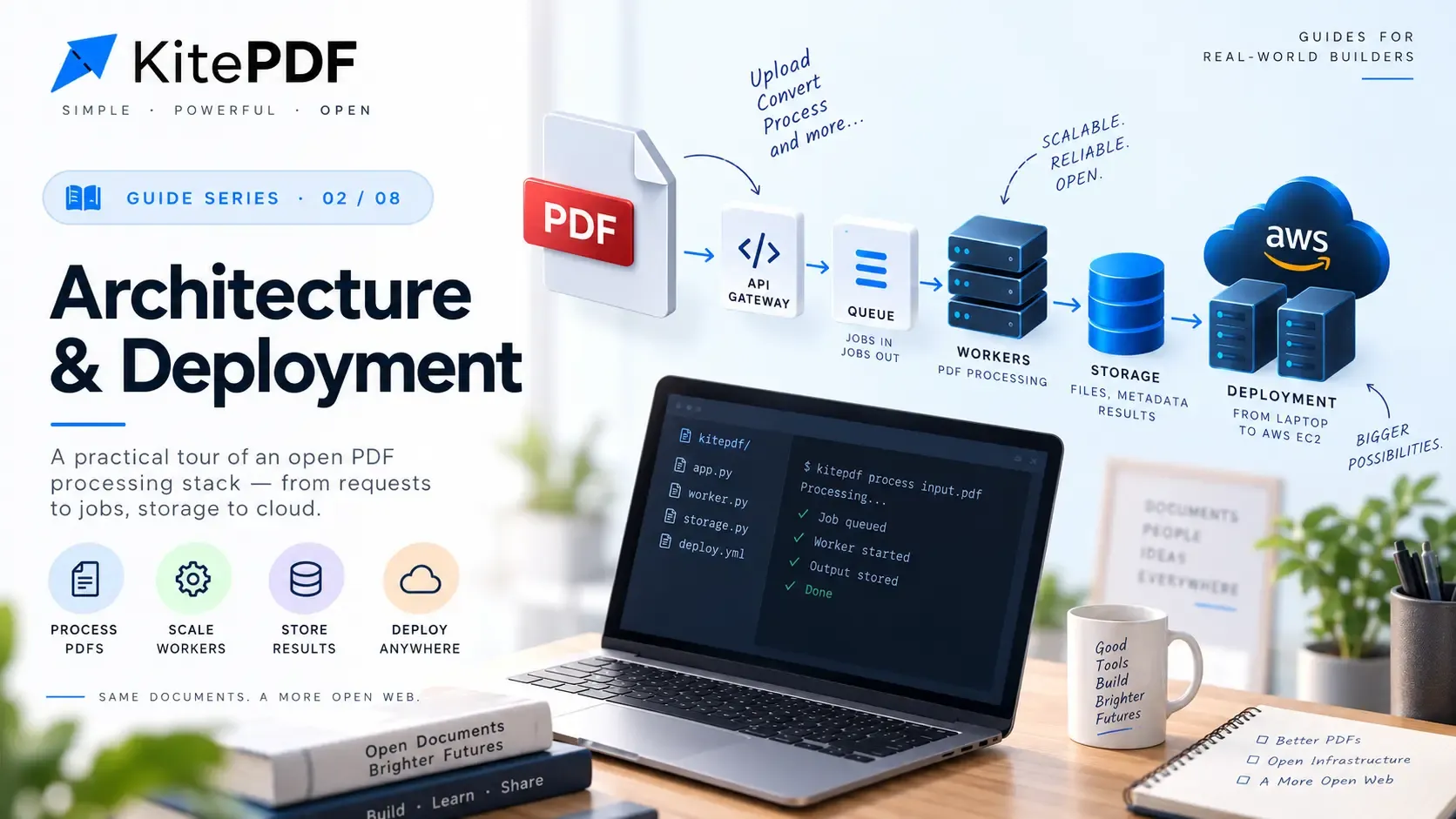
Why this guide exists
Part 2 explained trust zones and auth. This part explains how KitePDF actually runs on AWS today: one EC2 host, Docker Compose, managed Postgres on Neon, and Terraform for everything that should not live in git. The goal is not a copy-paste runbook—it is the reasoning behind each layer so you know what to change when you add a domain, scale workers, or tighten security.
The deployment shape we chose
KitePDF production is deliberately boring: a single Amazon Linux 2023 instance runs nginx plus the application containers. S3 holds bytes, SQS moves jobs, SSM Parameter Store holds secrets, CloudWatch Logs collects stdout, and Neon hosts both Postgres databases. There is no Kubernetes, no Elastic Beanstalk, and no Lambda in the critical path for PDF work.
| Choice | What we optimize for | What we accept |
|---|---|---|
| Single EC2 + Compose | Low ops surface, predictable cost, fast iteration | Manual or workflow-driven deploys; host is a single blast radius |
| Neon for both DBs | Managed backups, branching, no DB containers on the host | Network latency if region diverges from EC2 |
| Docker Hub images | Build on CI or laptop; EC2 only pulls | Public registry dependency; rebuild when NEXT_PUBLIC_* changes |
| HTTP on :80 (no EIP yet) | Ship quickly with public IP | IP can change on stop/start; CORS and auth URLs must follow |
On real AWS, the SDK resolves the regional endpoint automatically. LocalStack is the only place you point at a fake URL:
# Root env used only while Compose parses the file (illustrative host)DOCKERHUB_USER=your_registry_userREDIS_PASSWORD=use-the-same-value-in-terraform-tfvars
# Real AWS: do not set AWS_ENDPOINT_URL at all.# LocalStack laptop stack only:# AWS_ENDPOINT_URL=http://localhost:4566Three planes on AWS
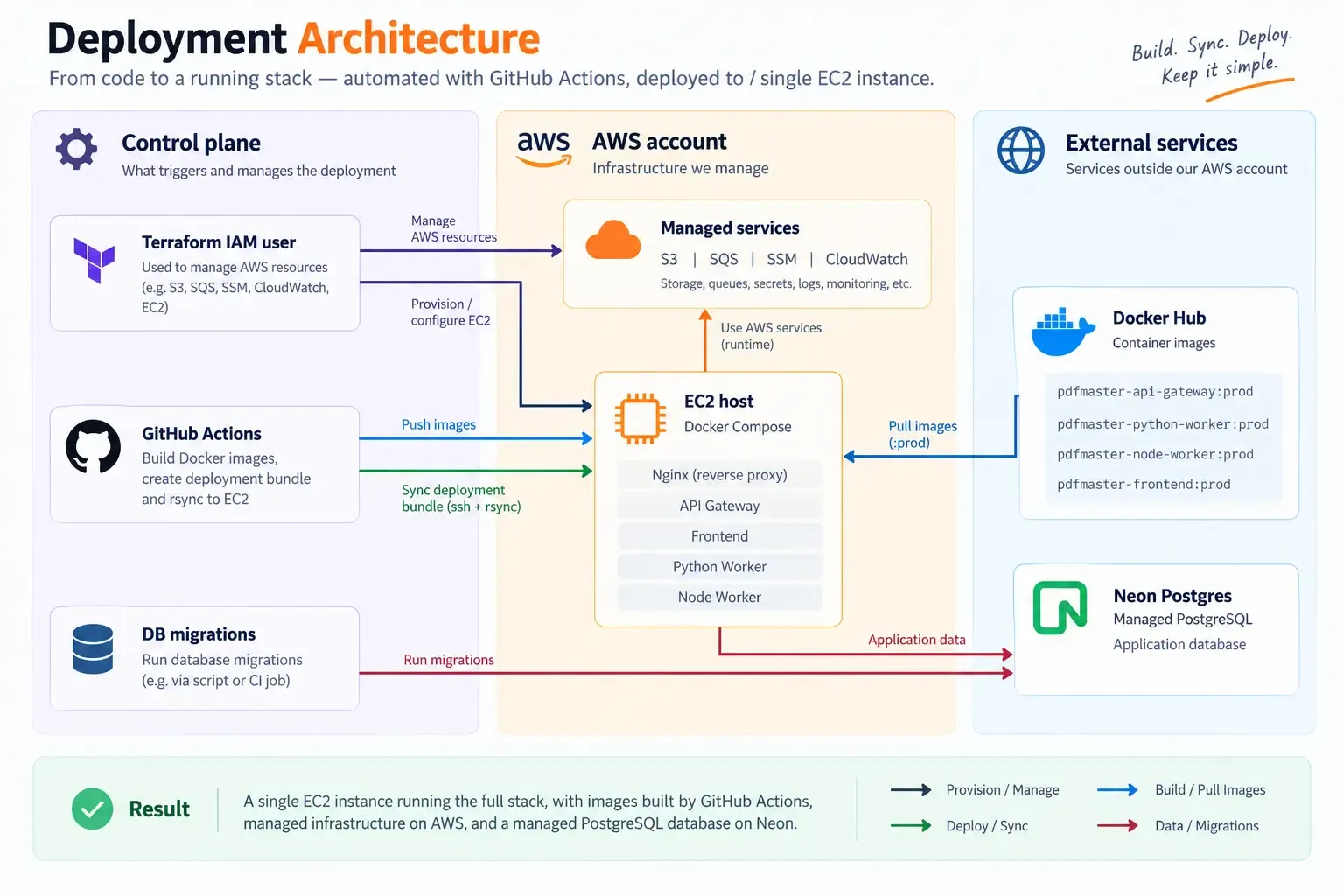
Read this as three responsibilities, not one tangled network. Control-plane work (Terraform, CI, migrations) happens rarely from outside the instance. The EC2 host is the only place browser traffic and workers run. Managed AWS services and external Neon/Docker Hub are dependencies the host reaches over the network—container layout is covered in the next section.
Terraform: what it owns
Infrastructure in infra/aws is applied with your IAM user credentials—not the EC2 role. It creates the app bucket (with CORS tied to the instance public IP), SQS queues for Node/Python/Go workers, SSM parameters under a configurable base path (default /pdf-master/prod), a CloudWatch log group, security group (SSH + HTTP), and the EC2 instance with an instance profile.
- Instance profile (pdf-master-prod-ec2-role): S3 object ops, SQS consume/send, SSM read for the path, CloudWatch Logs write—no long-lived access keys in containers.
- terraform.tfvars holds Neon URLs, redis_password, internal_secret, better_auth_secret, and other values that become SSM entries on apply.
- No Elastic IP by design: re-apply updates S3 CORS when the public IP changes; you must also update NEXT_PUBLIC_* and auth issuer/audience URLs.
- Use Neon direct endpoints in tfvars—not the pooler host. The pooler breaks Go prepared statements used by the api-gateway.
terraform.tfvars is where operator-owned secrets enter the system before Terraform writes them to SSM. Use fictional values in docs; never commit real passwords.
aws_region       = "us-east-1"ssm_base_path     = "/my-pdf-app/prod"s3_bucket_name    = "my-pdf-app-uploads-unique-suffix"ec2_key_name      = "my-keypair"ssh_ingress_cidr  = "203.0.113.50/32"
# Neon: direct compute host (not -pooler)backend_database_url  = "postgresql://user:pass@ep-abc123.us-east-1.aws.neon.tech/app_backend?sslmode=require"frontend_database_url = "postgresql://user:pass@ep-abc123.us-east-1.aws.neon.tech/app_frontend?sslmode=require"
redis_password = "long-random-string"internal_secret = "another-long-random-string"better_auth_secret = "yet-another-long-random-string"cd infra/awsterraform init && terraform apply
terraform output ec2_public_ipterraform output ssm_parameter_pathNeon pooler vs direct host — the hostname shape matters more than the ORM:
# Direct (Go prepared statements, migrations)postgresql://...@ep-xxxx.us-east-1.aws.neon.tech/neondb
# Pooler (fine for some clients, wrong for this stack)postgresql://...@ep-xxxx-pooler.us-east-1.aws.neon.tech/neondbSecrets: bootstrap env vs SSM
We split configuration on purpose. Root .env.prod.aws only supplies values Docker Compose substitutes when parsing the file: DOCKERHUB_USER, REDIS_PASSWORD, and NEXT_PUBLIC_* build args for the frontend image. Per-service .env.prod.aws files are injected into their containers via env_file and carry bootstrap fields such as AWS_REGION and SSM_PARAMETER_PATH.
Sensitive shared values—BACKEND_DATABASE_URL, FRONTEND_DATABASE_URL, INTERNAL_SECRET, BETTER_AUTH_SECRET, REDIS_URL, S3 bucket name, SQS queue URLs—are loaded at runtime from SSM using the EC2 instance role. The api-gateway, workers, and frontend (via instrumentation bootstrap) all follow the same contract: region + path, then fetch parameters by path.
| Variable class | Where it lives | When it changes |
|---|---|---|
| NEXT_PUBLIC_* | Root .env.prod.aws; baked into frontend image | Rebuild and push frontend; pull on EC2 |
| AUTH_ISSUER / AUTH_AUDIENCE / BETTER_AUTH_URL | GitHub secrets or api-gateway/frontend env on host | Must match public browser URL (trailing slash rules differ) |
| AUTH_JWKS_URL | api-gateway env: http://frontend:3000/api/auth/jwks | Docker DNS on the compose network—not the public URL |
| DB URLs, queue URLs, INTERNAL_SECRET | SSM via Terraform | terraform apply + restart affected containers |
Compose substitution at the repo root vs bootstrap inside each container — two different files, two different lifecycles (IP 203.0.113.10 is RFC 5737 documentation space):
# Repo root — only vars referenced in compose.yml itselfDOCKERHUB_USER=demoREDIS_PASSWORD=matches-terraform-redis_passwordNEXT_PUBLIC_APP_URL=http://203.0.113.10NEXT_PUBLIC_API_URL=http://203.0.113.10/core/v1PORT=8080ENV=productionAWS_REGION=us-east-1SSM_PARAMETER_PATH=/my-pdf-app/prodAUTH_JWKS_URL=http://frontend:3000/api/auth/jwksAUTH_ISSUER=http://203.0.113.10/AUTH_AUDIENCE=http://203.0.113.10/At runtime the process reads SSM with the instance role — no AWS_ACCESS_KEY_ID in the container. The pattern is always region + path, then merge into config:
// Illustrative startup — not production codeasync function loadConfigFromSSM({ region, path }) {  const client = new SSMClient({ region });  const out = await client.send(    new GetParametersByPathCommand({      Path: path,      Recursive: true,      WithDecryption: true,    }),  );  return Object.fromEntries(    out.Parameters.map((p) => [      p.Name.replace(path + "/", "").replaceAll("/", "_"),      p.Value,    ]),  );}
// App merges: { ...process.env, ...await loadConfigFromSSM(...) }# Smoke on the instance — should show the EC2 instance role, not your laptop useraws sts get-caller-identity
aws ssm get-parameters-by-path \ --path /my-pdf-app/prod \ --recursive \ --region us-east-1 \ --query 'Parameters[].Name'What runs on the EC2 host
docker-compose.prod.aws.yml defines redis (not published to the host), api-gateway, frontend, nginx, and both workers. Only nginx binds port 80. Browser traffic hits / for the Next.js app and /core/v1/ for the Go API; /core/health is the health check path (there is no /core/v1/health).
Container logs ship to CloudWatch via the Docker awslogs driver (log group /pdf-master/prod). Redis stays on the internal network; operators reach it with docker exec and redis-cli if needed.
Only the edge proxy publishes a host port. Workers talk to the API on the internal Docker network:
services:  redis:    image: redis:7-alpine    # no ports: — not reachable from the internet
  api:    image: demo/api:prod    env_file: ./api/.env.prod.aws
  web:    image: demo/web:prod    env_file: ./web/.env.prod.aws
  worker:    image: demo/worker:prod    environment:      API_GATEWAY_BASE_URL: http://api:8080
edge: image: nginx:alpine ports: - "80:80" depends_on: [web, api]docker compose --env-file .env.prod.aws -f docker-compose.prod.aws.yml up -dcurl -sf "http://203.0.113.10/core/health"Auth and URLs in production
Production auth is the same model as Part 2, but environment alignment becomes the main failure mode. BETTER_AUTH_URL and NEXT_PUBLIC_BETTER_AUTH_URL must reflect what the browser uses (today often http://EC2_PUBLIC_IP). AUTH_ISSUER and AUTH_AUDIENCE for the gateway typically use the same origin with a trailing slash on issuer/audience as configured in deploy workflows.
Same deployment, three URL contexts — mix these up and JWT validation fails even when login looks fine:
# Browser / cookies (no trailing slash on BETTER_AUTH_URL)BETTER_AUTH_URL=http://203.0.113.10NEXT_PUBLIC_BETTER_AUTH_URL=http://203.0.113.10
# API gateway JWT checks (issuer/audience often include trailing slash)AUTH_ISSUER=http://203.0.113.10/AUTH_AUDIENCE=http://203.0.113.10/
# Inside Compose — Docker DNS, never the public IPAUTH_JWKS_URL=http://frontend:3000/api/auth/jwks# After rotating BETTER_AUTH_SECRET without clearing stale keys (frontend DB)psql "$FRONTEND_DATABASE_URL" -c 'TRUNCATE TABLE jwks;'docker compose --env-file .env.prod.aws restart frontendDatabase migrations (outside the host)
Schema changes do not run when containers start. You apply backend migrations (goose) and frontend Better Auth migrations from a trusted machine with DATABASE_URL pointing at Neon. That keeps deploys reversible and avoids racing multiple containers on migrate.
# Laptop or CI — direct Neon host in DATABASE_URLcd api-gatewayDATABASE_URL='postgresql://...@ep-xxxx.us-east-1.aws.neon.tech/backend?sslmode=require' \  make migrate-up
cd ../frontendDATABASE_URL='postgresql://...@ep-xxxx.us-east-1.aws.neon.tech/frontend?sslmode=require' \ npx @better-auth/cli migrateDelivery pipeline
The Deploy AWS GitHub Actions workflow is the blessed path for repeat deploys: build four application images on linux/amd64 (important on Apple Silicon laptops), push to Docker Hub, assemble a deploy bundle (compose file, nginx config, generated .env.prod.aws files from GitHub secrets), rsync to ~/pdf-master on EC2, docker login, compose pull, compose up -d.
- GitHub secrets: Docker Hub, EC2_HOST, EC2_SSH_KEY, REDIS_PASSWORD, NEXT_PUBLIC_*, AWS_REGION, SSM_PARAMETER_PATH, AUTH_*, BETTER_AUTH_URL, SMTP/Mailgun as needed.
- Repo-root .env.github.aws (gitignored) can bulk-load secrets via gh secret set -f.
- Concurrency group deploy-aws avoids overlapping SSH deploys.
name: Deployon: workflow_dispatch:concurrency: group: deploy-prodjobs: build: runs-on: ubuntu-latest steps: - uses: actions/checkout@v4 - run: | docker build --platform linux/amd64 -t user/app-api:prod ./api docker push user/app-api:prod deploy: needs: build steps: - run: | rsync -az ./deploy-bundle/ ec2-user@203.0.113.10:~/app/ ssh ec2-user@203.0.113.10 'cd ~/app && docker compose pull && docker compose up -d'DOCKER_DEFAULT_PLATFORM=linux/amd64 docker build -t user/app-web:prod ./webgh secret set -f .env.github.aws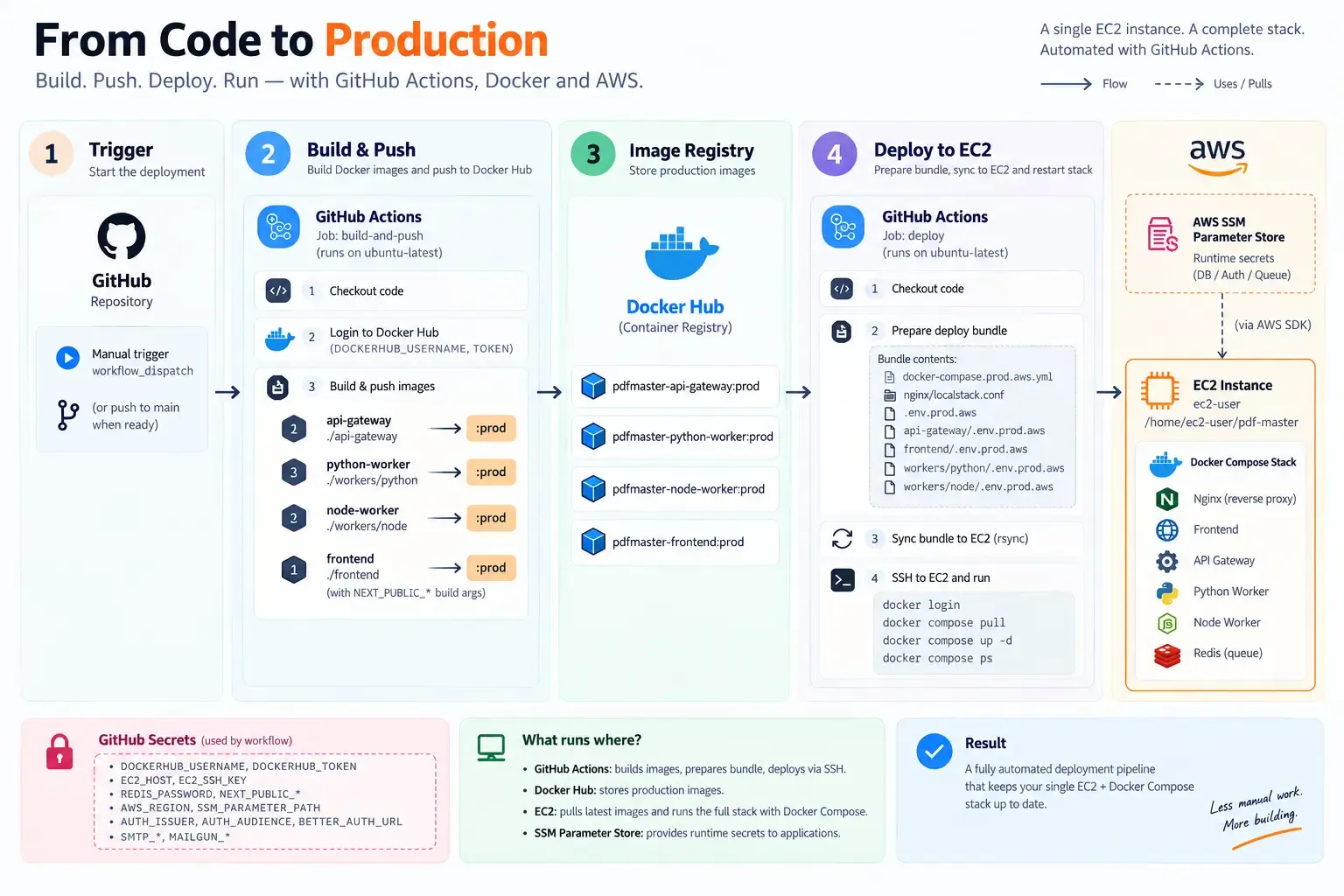
First-time path (operator checklist)
- STEP01
Provision AWS with Terraform
Fill infra/aws/terraform.tfvars, apply, note ec2_public_ip and SSM path. Smoke-test on the instance: aws sts get-caller-identity should show the instance role; list SSM names under your path.
Provision AWS with Terraformyamlcd infra/aws && terraform applyterraform output ec2_public_ip# on the new instanceaws sts get-caller-identityaws ssm get-parameters-by-path --path /my-pdf-app/prod --recursive --region us-east-1 - STEP02
Prepare env files
Set root and per-service .env.prod.aws with the public IP, matching redis password, and internal JWKS URL for api-gateway. Keep NEXT_PUBLIC_API_URL at http://IP/core/v1.
Prepare env filesyamlexport IP=203.0.113.10echo "NEXT_PUBLIC_API_URL=http://$IP/core/v1" >> .env.prod.awsgrep AUTH_JWKS_URL api-gateway/.env.prod.aws# expect http://frontend:3000/api/auth/jwks - STEP03
Migrate Neon
Run api-gateway and frontend migrations against direct Neon hosts before serving traffic.
Migrate NeonyamlDATABASE_URL='postgresql://...@ep-direct.neon.tech/backend?sslmode=require' make migrate-upDATABASE_URL='postgresql://...@ep-direct.neon.tech/frontend?sslmode=require' npx @better-auth/cli migrate - STEP04
Build and push images
On amd64-capable builders: DOCKER_DEFAULT_PLATFORM=linux/amd64 when building on ARM Macs. Push all four pdfmaster-*:prod tags.
Build and push imagesyamlexport DOCKER_DEFAULT_PLATFORM=linux/amd64docker build -t user/pdfmaster-api:prod ./api-gateway && docker push user/pdfmaster-api:prod# repeat for web + workers - STEP05
Prepare EC2
Docker engine, compose v2 plugin, directory layout under ~/pdf-master, copy compose + env + nginx/localstack.conf (HTTP-only until you add TLS).
Prepare EC2yamlssh ec2-user@203.0.113.10 'mkdir -p ~/pdf-master'scp docker-compose.prod.aws.yml .env.prod.aws ec2-user@203.0.113.10:~/pdf-master/ - STEP06
Pull and run
Always pass --env-file .env.prod.aws for compose commands so REDIS_PASSWORD interpolation works. Verify / and /core/health, then register, run a tool, confirm presigned S3 download.
Pull and runyamldocker compose --env-file .env.prod.aws -f docker-compose.prod.aws.yml pulldocker compose --env-file .env.prod.aws -f docker-compose.prod.aws.yml up -dcurl -sf "http://203.0.113.10/" -o /dev/nullcurl -sf "http://203.0.113.10/core/health"
Production lessons (design, not luck)
| Symptom | Root cause | Fix pattern |
|---|---|---|
| Slow pages, low RAM used | Neon in a different region than EC2 | Colocate region or move one side |
| Worker HeadObject 403 on missing key | IAM missing s3:ListBucket on prefixes | terraform apply iam.tf; no image rebuild |
| pq prepared statement errors | Neon pooler URL in SSM | Direct host in tfvars → apply → restart API/frontend |
| JWT valid but dashboard bounce | JWKS rows vs BETTER_AUTH_SECRET mismatch | Clear jwks table + restart frontend |
| CORS or auth after reboot | Public IP changed | terraform apply (CORS) + update URLs + rebuild frontend |
Prepared-statement errors almost always trace back to the pooler hostname in SSM:
# Wrong (in terraform.tfvars → SSM)backend_database_url = "postgresql://...@ep-xxxx-pooler.region.aws.neon.tech/db"
# Rightbackend_database_url = "postgresql://...@ep-xxxx.region.aws.neon.tech/db"
cd infra/aws && terraform applydocker compose --env-file .env.prod.aws restart api-gateway frontendDay-2 operations
- Logs: CloudWatch → /pdf-master/prod (or compose logs on the host).
- Runtime-only env change: scp the file, compose up -d or restart that service.
- SSM or Terraform change: apply, then restart containers that cache SSM at startup.
- NEXT_PUBLIC change: rebuild frontend in CI or locally, push, pull on EC2.
- Scale workers today: increase replicas in compose or add another host—queues are the extension point.
# Runtime env tweak on the hostdocker compose --env-file .env.prod.aws -f docker-compose.prod.aws.yml restart api-gateway
# Public IP changed — CORS + URLs + frontend rebuildcd infra/aws && terraform applydocker compose --env-file .env.prod.aws -f docker-compose.prod.aws.yml logs -f --tail=100 nginxWhat we have not done yet
The current stack is HTTP on a raw public IP. Elastic IP or DNS, TLS with nginx/aws.conf on 443, tighter ssh_ingress_cidr, remote Terraform state, and autoscaling workers are intentional follow-ups—not blockers for proving the product on real AWS.
What to read next
Revisit Part 2 when debugging auth across environments. Future parts in this series can cover local dev, prod-localstack fidelity, and horizontal scaling. When you promote to a domain, treat URL and JWT issuer alignment as a single change set: Terraform CORS, all env URLs, frontend rebuild, and cookie domain behavior.